Building ZenPanel: An Open-Source Admin Dashboard for any Web Framework like Next.js, Vite, angular, vue, html, solid, astro, react, preact
Modern web applications often require an admin panel for managing users, content, products, payments, projects, and other important resources. However, building the same dashboard structure from scratch for every project can be repetitive and time-consuming.
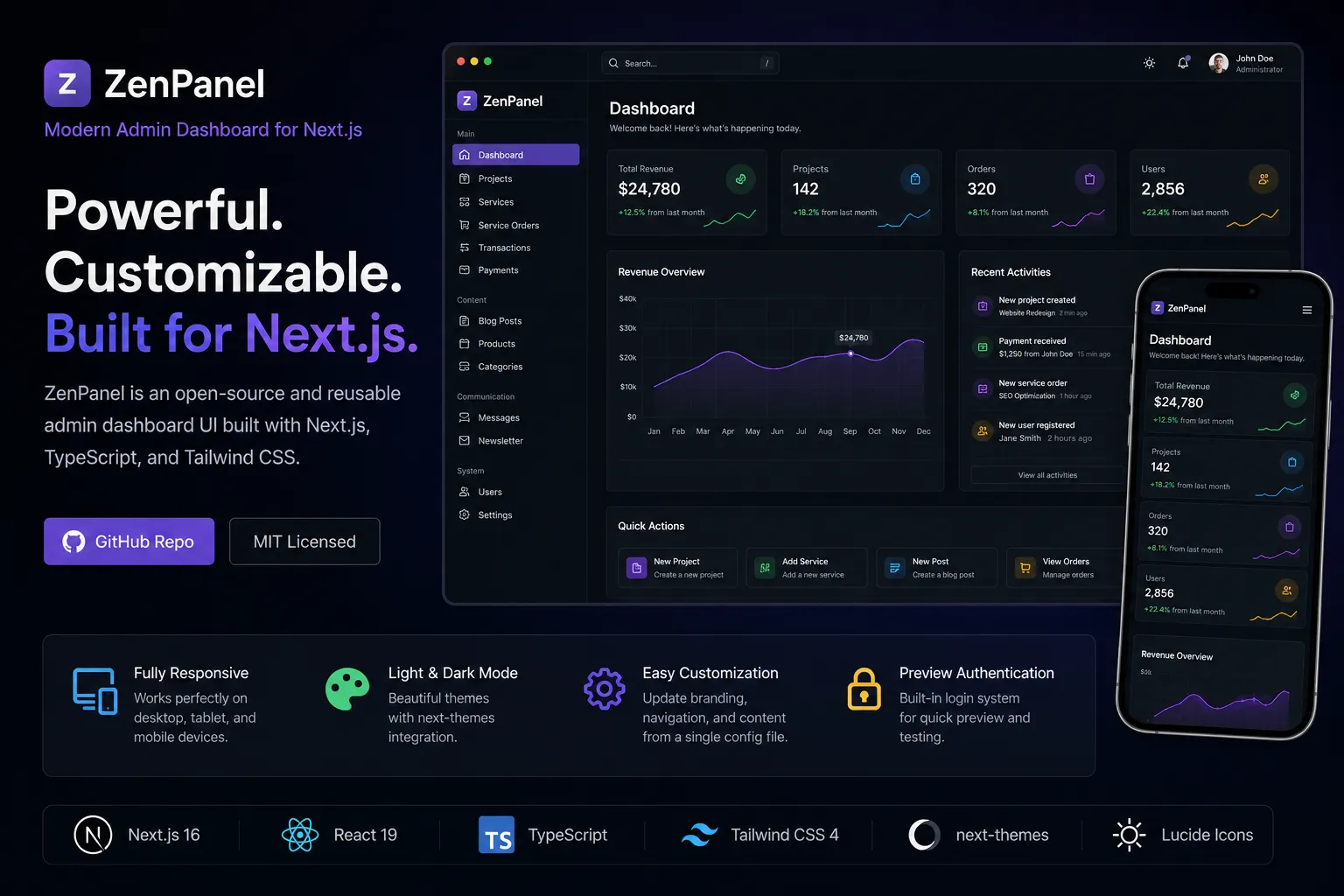
Building an admin dashboard from scratch often means repeating the same work. Most projects need a sidebar, navigation, data tables, authentication pages, dashboard statistics, responsive layouts, and theme support. Although the business requirements may be different, the basic interface usually remains very similar.
To solve this problem, I built ZenPanel, an open source and reusable admin interface designed for modern Next.js applications.
ZenPanel gives developers a clean frontend foundation that can be customized and connected to any backend, database, authentication provider, or API.
You can explore the project on GitHub:
https://github.com/foisalislambd/zenpanel
What Is ZenPanel?
ZenPanel is a responsive admin dashboard built with Next.js, React, TypeScript, and Tailwind CSS. It includes the essential layouts and components commonly required in admin applications.
The interface comes with responsive sidebar navigation, a header and breadcrumb system, dashboard statistics, revenue charts, recent activity sections, quick actions, resource management tables, a login page, light and dark themes, and mobile friendly navigation.
The project currently focuses on the frontend experience. It uses sample data so developers can explore the full interface before connecting it to a real backend.
This makes it possible to clone the repository, run the project, and understand how the dashboard works without configuring a database or adding environment variables first.
Why I Built ZenPanel
While working on different web applications, I noticed that most admin dashboards follow the same basic structure.
Almost every project needs a sidebar, dashboard overview, authentication page, data tables, navigation management, responsive design, and theme support. Rebuilding these elements for every new application takes time that could be spent on more important features.
My goal was to create a flexible admin foundation that could be reused across different types of projects.
ZenPanel can serve as a starting point for SaaS products, ecommerce platforms, portfolio management systems, marketplaces, internal company tools, content management systems, and client projects.
Instead of starting with an empty application, developers can begin with a complete interface and focus on their product logic, backend integration, and user experience.
Technology Stack
ZenPanel is built with a modern frontend technology stack that focuses on performance, maintainability, and flexibility.
Next.js 16
The project uses the Next.js App Router to organize routes and layouts. This provides a scalable application structure and a modern React development experience.
The App Router also makes it easier to separate dashboard pages, authentication screens, shared layouts, and future backend functionality.
React 19
The interface is divided into reusable React components. This makes the dashboard easier to maintain, extend, and move into other projects.
Common interface elements such as navigation items, cards, tables, charts, headers, and action sections can be reused across multiple pages without repeating the same code.
TypeScript
TypeScript improves reliability by making data structures and component properties easier to understand.
It also helps developers identify errors earlier when adding new pages, resources, settings, or configuration options.
For a reusable project such as ZenPanel, clear types make the codebase easier for other developers to explore and modify.
Tailwind CSS 4
Tailwind CSS is used to create a responsive and consistent design system.
It provides control over spacing, typography, layout, borders, responsive behavior, and theme styles without requiring a large external component library.
This keeps the interface flexible and makes it easier for developers to change the visual style.
next-themes
ZenPanel uses next-themes to manage light and dark modes.
The theme system is organized so that users can switch between themes smoothly while maintaining consistent colors, surfaces, borders, and text contrast throughout the dashboard.
Lucide React
Lucide React provides lightweight and consistent icons for navigation links, dashboard statistics, buttons, tables, and quick actions.
Using one icon system helps maintain a clean and unified visual language across the interface.
Centralized Configuration
One of the most important decisions I made while building ZenPanel was to keep branding and navigation settings in one central configuration file.
Developers can use this file to update the brand name, tagline, logo letter, login page content, navigation items, icons, links, feature descriptions, and resource information.
This approach makes the dashboard much easier to customize.
Instead of opening several components and changing the same information in different places, a developer can update one configuration file and transform ZenPanel into a different admin experience.
For example, ZenPanel can be adapted for an ecommerce platform by adding product, order, category, payment, and customer links. The same project can be turned into a portfolio management dashboard by replacing those links with projects, services, case studies, messages, and content settings.
Centralized configuration reduces duplication and makes the project more suitable for reuse.
Dashboard Experience
The main dashboard is designed to present important information clearly without making the interface feel overwhelming.
It includes statistical cards, a revenue visualization, recent activities, and quick action sections. The current values are sample data, but each component can later be connected to a real API or database.
The statistics area can be used to display information such as total users, revenue, active projects, orders, messages, subscriptions, or any other important business metric.
The chart section can be connected to financial reports, user growth, sales performance, traffic data, or application activity.
Recent activity can display new registrations, payments, completed orders, project updates, support messages, or system events.
Quick actions allow administrators to reach important tasks without searching through several pages.
The goal was to create a dashboard structure that works for different products while remaining simple enough to customize.
Resource Management
ZenPanel includes several resource management pages that demonstrate how different types of content can be organized.
The current navigation covers projects, services, service orders, transactions, payments, blog posts, products, categories, messages, newsletter subscribers, users, and settings.
These resources are not limited to one specific application.
The project section could be used to manage portfolio work, client projects, development tasks, or case studies. The products and categories sections could become part of an ecommerce platform. The messages page could display contact form submissions or customer support requests.
The service order section could be adapted for bookings, freelance work, agency requests, or subscription services.
Because the pages follow a reusable structure, developers can rename them, change their fields, connect them to an API, or use them as references when creating new resources.
Responsive Design
An admin dashboard should not be limited to desktop screens.
Administrators often need to review information, check payments, read messages, or perform quick actions while using a tablet or phone.
For this reason, I designed ZenPanel to provide a consistent experience across desktop, tablet, and mobile devices.
The dashboard layout adjusts based on the available screen size. Cards, charts, tables, navigation elements, and content sections reorganize themselves so the interface remains readable.
The sidebar also changes into a mobile friendly navigation experience on smaller screens.
Responsive behavior was planned as part of the interface from the beginning rather than being added after the desktop design was completed.
This helped create a more consistent experience across different devices.
Light and Dark Themes
ZenPanel includes complete support for light and dark modes.
Creating a good dark theme involves more than reversing the colors. Dashboard backgrounds, cards, borders, text hierarchy, interactive states, navigation items, charts, and form elements all need to remain readable and visually balanced.
The theme system keeps these styles organized and reusable.
Users can switch between light and dark modes while the interface maintains consistent spacing, contrast, and visual hierarchy.
Developers can also modify the theme styles to match their own brand identity.
Preview Authentication
The project includes a login screen with a simple preview authentication system.
For demonstration purposes, the authentication state is stored in memory. It does not require a backend, environment variables, secret keys, or external credentials.
This allows developers to open the project and explore the dashboard immediately.
The preview system is intentionally kept separate from real authentication logic. It is designed only to demonstrate the login experience and protected dashboard flow.
Developers can replace it with any authentication solution they prefer, including NextAuth, Clerk, Supabase Auth, Firebase Authentication, Auth0, or a custom backend using JSON Web Tokens.
This keeps ZenPanel flexible and prevents the project from being tied to one authentication provider.
Reusable Project Architecture
I organized ZenPanel so that its admin functionality can be moved into another Next.js application without requiring a complete rewrite.
The project separates admin routes, shared components, theme components, configuration, interface state, preview data, API placeholders, and utility functions.
This separation makes the codebase easier to understand.
A developer can replace the sample data without changing the interface. The authentication system can be replaced without rebuilding the dashboard. Navigation can be updated without editing the sidebar component. The theme can be modified without changing every page individually.
This structure also makes it easier to add new features while keeping the project organized.
What I Learned While Building ZenPanel
Building ZenPanel helped me improve my understanding of several important frontend development concepts.
Reusable Components
Admin dashboards contain many repeated interface patterns. Cards, tables, headers, filters, navigation links, forms, and action buttons often appear across several pages.
Designing these components for reuse requires careful planning. They need to support different types of content while maintaining a consistent appearance.
Working on ZenPanel helped me think more carefully about component responsibilities, properties, composition, and flexibility.
Configuration Driven Interfaces
Moving branding and navigation into a configuration layer significantly reduced duplication.
It also made the project easier to customize without changing the internal component logic.
This approach is especially useful when creating templates, reusable systems, or products that may need different branding for different clients.
Responsive Dashboard Design
Admin interfaces often contain dense information. Tables, charts, navigation items, filters, and statistics can quickly become difficult to use on smaller screens.
Responsive dashboard design requires more than reducing widths. Content priority, navigation behavior, table overflow, card layout, and touch interaction all need to be considered.
Building ZenPanel helped me understand how to make information heavy interfaces work across different screen sizes.
Theme Architecture
Supporting dark mode requires consistency across the complete application.
Surface colors, text contrast, borders, inputs, buttons, charts, hover states, and selected navigation items must all work together.
A poorly organized theme can result in unreadable content and inconsistent components.
ZenPanel helped me improve the way I structure theme styles and reusable design tokens.
Separating the Interface From Backend Logic
ZenPanel is intentionally backend independent.
The interface does not assume which database, API, authentication service, or server technology a developer will use.
Keeping the frontend separate from backend logic makes the project easier to integrate into different systems.
It also allows developers to use the same interface with REST APIs, GraphQL, server actions, Supabase, Firebase, custom Node.js servers, or other backend solutions.
Future Improvements
ZenPanel already provides a useful frontend foundation, but there are many features I would like to add in the future.
I plan to explore real authentication examples, role based access control, more chart components, advanced table filtering, sorting, pagination, form validation, notifications, and a command palette.
Additional dashboard layouts and reusable resource templates could make the project suitable for an even wider range of applications.
Backend integration examples would also help developers understand how to connect the interface to real APIs and databases.
Automated testing and expanded accessibility support are other important areas for future development.
The project will continue to evolve based on real use cases, developer feedback, and community contributions.
Open Source Development
ZenPanel is available as an open source project under the MIT License.
Developers can explore the code, use it in their own applications, report issues, suggest improvements, and contribute new features.
The repository includes contribution guidelines, a code of conduct, security information, continuous integration, and a changelog.
These additions help keep the open source development process organized and make it easier for others to participate.
My goal is not only to share the interface but also to build a project that developers can understand, improve, and adapt to their own needs.
Final Thoughts
ZenPanel represents the way I approach modern frontend development. I focus on reusable components, clean architecture, centralized configuration, responsive design, and developer flexibility.
Instead of building a dashboard for only one application, I wanted to create a foundation that could support many different products.
The project helped me strengthen my skills in Next.js, React, TypeScript, Tailwind CSS, responsive interface design, theme management, reusable component architecture, and open source project organization.
ZenPanel is still evolving, and I look forward to improving it further and turning it into an even more useful admin dashboard foundation for the Next.js ecosystem.
Explore the source code on GitHub: