ZenPanel — Open-Source Admin Dashboard for Next.js, Vite, angular, vue, html, solid, astro, react, preact
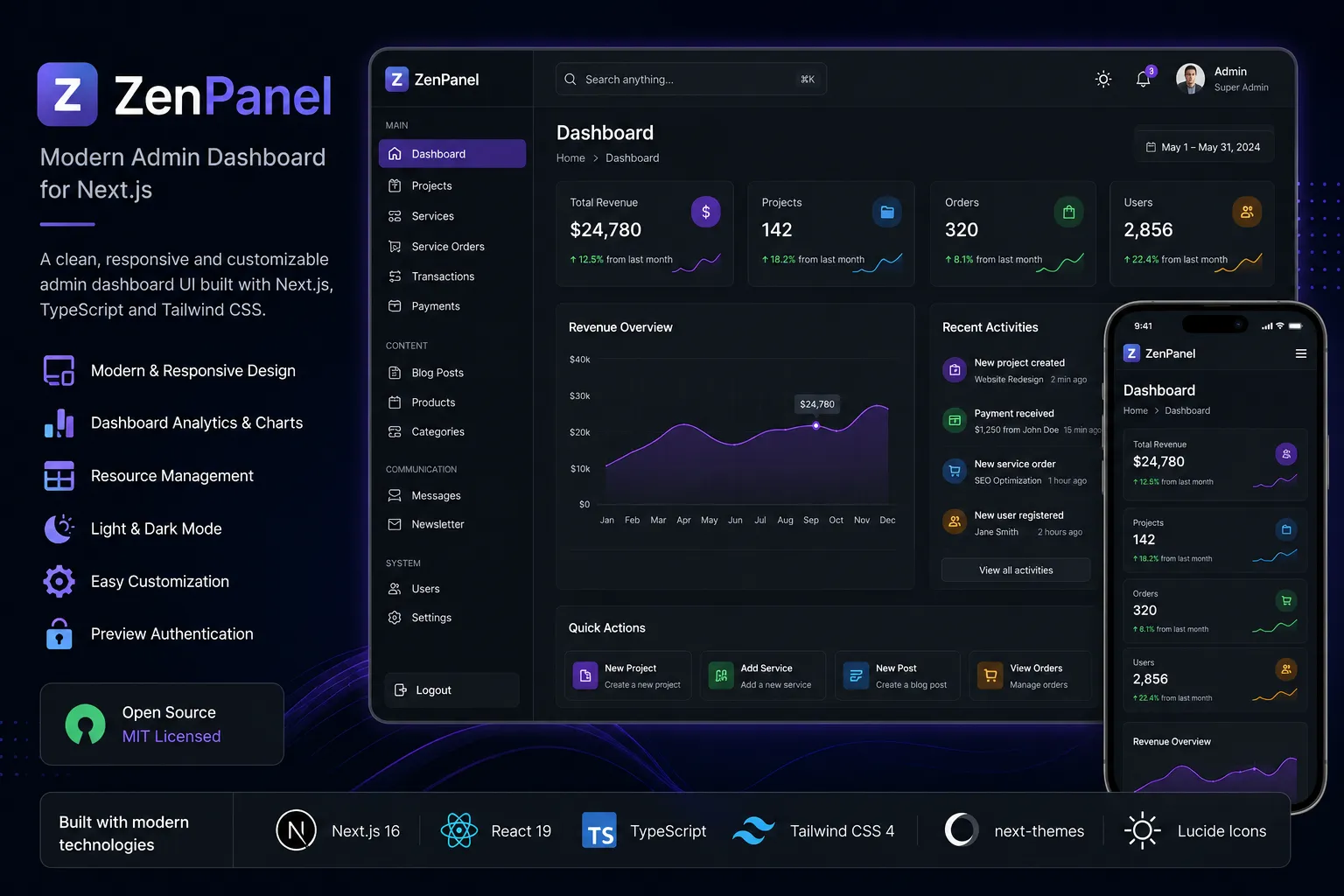
ZenPanel is a modern, responsive, and reusable admin dashboard UI built with Next.js, React, TypeScript, and Tailwind CSS. It provides a complete frontend foundation for SaaS platforms, e-commerce applications, portfolio management systems, marketplaces, and internal business tools.
Project Overview
Building an admin dashboard from scratch for every project can be repetitive and time consuming. Although applications may serve different purposes, most admin interfaces require the same basic elements, including navigation, statistics, data tables, authentication screens, responsive layouts, and theme support.
I created ZenPanel to provide a reusable solution to this problem.
ZenPanel is an open source admin UI shell built for modern Next.js applications. Developers can customize the interface and connect it to their preferred backend, database, API, or authentication system.
The project includes sample data and a preview login system, allowing developers to explore the complete dashboard without configuring a backend first.
The Problem
While working on different web applications, I noticed that developers often spend a considerable amount of time rebuilding the same admin dashboard structure.
Most projects require a sidebar, header navigation, dashboard analytics, data management pages, login screens, responsive layouts, theme support, and reusable interface components. Branding and navigation also need to be updated for each application.
Recreating these elements repeatedly increases development time and can make it difficult to maintain a consistent design across different projects.
I wanted to create a foundation that handled these common requirements while remaining flexible enough to support different types of applications.
The Solution
ZenPanel provides a ready to use admin dashboard foundation for Next.js projects.
The codebase separates routes, reusable components, configuration, theme management, interface state, and sample data into an organized project structure. This allows developers to replace or modify individual parts of the dashboard without rebuilding the complete interface.
Branding and navigation are managed through a centralized configuration file. Developers can update the project name, tagline, logo, login content, navigation links, icons, and resource descriptions from one place.
The dashboard is also independent of any specific backend or authentication provider. It can be connected to REST APIs, GraphQL, server actions, Supabase, Firebase, a custom Node.js backend, or another service.
Key Features
ZenPanel includes a responsive dashboard layout with collapsible sidebar navigation, header controls, breadcrumbs, statistics cards, a revenue overview chart, recent activity, and quick action sections.
It also includes reusable resource management pages for projects, services, service orders, transactions, payments, blog posts, products, categories, newsletter subscribers, messages, users, and application settings.
The interface supports light and dark themes, desktop and mobile navigation, preview authentication, centralized branding, configurable sidebar items, and reusable React components.
Because the project is backend independent, developers can use the interface as a starting point for SaaS products, ecommerce platforms, portfolio management systems, marketplaces, internal tools, content management systems, and client projects.
Technology Stack
ZenPanel is built with Next.js 16 and uses the App Router to organize pages, layouts, and dashboard routes.
React 19 is used to divide the interface into reusable components. This makes common elements such as cards, tables, navigation items, charts, and page headers easier to maintain and reuse.
TypeScript provides clear component properties and data structures, helping developers understand and extend the project more safely.
Tailwind CSS 4 is used to create the responsive design system, including spacing, typography, layouts, borders, and theme styles.
The project also uses next-themes for light and dark mode support, Lucide React for interface icons, clsx for conditional class names, and tailwind-merge for combining Tailwind classes safely.
My Role
I designed and developed the complete frontend architecture of ZenPanel.
My work included planning the dashboard structure, designing the interface, creating reusable React components, and building responsive layouts for desktop, tablet, and mobile devices.
I implemented the sidebar and header navigation, dashboard widgets, resource management pages, theme system, centralized configuration, and preview authentication flow.
I also organized the repository for open source use by preparing documentation, installation instructions, contribution guidelines, security information, a code of conduct, continuous integration, and a changelog.
Main Challenges
Creating a Reusable Architecture
One of the main challenges was ensuring that the dashboard could support different types of applications without being tied to one business model.
A dashboard built specifically for an ecommerce application may not work for a portfolio, SaaS platform, or internal management tool. To avoid this limitation, I separated branding, navigation, reusable components, dashboard widgets, and preview data into dedicated modules.
This structure allows developers to customize the interface without changing the internal logic of every component.
Supporting Different Screen Sizes
Admin dashboards often contain large amounts of information, including charts, tables, statistics, filters, and navigation controls. Displaying this information on smaller screens can be difficult.
I created a responsive system that adjusts the sidebar, dashboard cards, tables, content sections, and navigation depending on the available screen size.
On desktop screens, the sidebar remains easily accessible. On tablets and mobile devices, the navigation changes into a more compact layout while keeping important controls available.
Responsive behaviour was considered from the beginning instead of being added after the desktop version was completed.
Building a Flexible Theme System
The interface needed to remain clear and consistent in both light and dark modes.
Dark mode requires more than changing the page background. Cards, borders, text, navigation states, buttons, inputs, charts, and interactive elements must remain readable and visually balanced.
I used next-themes and created reusable theme styles for surfaces, text hierarchy, borders, navigation items, and interactive states.
This keeps the theme implementation organized and allows developers to modify the visual style more easily.
Keeping the Project Backend Independent
I wanted developers to be able to use ZenPanel with any backend technology.
To achieve this, the project uses sample data and API placeholders rather than depending on a specific database, server framework, or authentication provider.
The preview authentication system is stored in memory and is intended only for demonstrating the interface. Developers can replace it with NextAuth, Clerk, Supabase Auth, Firebase Authentication, Auth0, or a custom JWT based authentication system.
This approach keeps the project flexible and prevents it from being locked into one service.
Project Architecture
ZenPanel follows a modular structure designed to make customization and maintenance easier.
Admin routes are separated from shared components, dashboard widgets, theme controls, configuration files, interface state, preview data, API placeholders, and utility functions.
The navigation component reads its content from the configuration instead of containing fixed links. Dashboard widgets are separated from page layouts, and the preview data can be replaced without changing the presentation layer.
This separation allows developers to replace authentication, connect real data, modify branding, add resources, or move the admin interface into another Next.js project with fewer changes.
Centralized Customization
One of ZenPanel’s most useful features is its centralized configuration system.
Developers can change the brand name, tagline, logo letter, login description, login features, navigation links, icons, page descriptions, and resource sections from one configuration file.
For example, the same dashboard can be adapted into an ecommerce administration system by adding products, orders, categories, payments, and customers.
It can also become a portfolio dashboard by replacing those sections with projects, services, case studies, messages, and blog content.
This configuration driven approach reduces duplicated code and makes the project much easier to reuse.
Authentication
ZenPanel includes a preview login system that allows users to test the complete dashboard flow without setting up a backend.
The authentication state is stored temporarily in memory and does not require credentials, secret keys, environment variables, or database access.
This system is intended only for interface demonstrations. It is intentionally separated from real authentication logic so developers can replace it with their preferred provider.
Supported options could include NextAuth, Clerk, Supabase Auth, Firebase Authentication, Auth0, or a custom backend using JSON Web Tokens.
Results
ZenPanel provides a complete frontend foundation that can reduce the amount of time required to build an admin interface.
Instead of recreating navigation, responsive layouts, dashboard widgets, data pages, theme support, and login screens for every project, developers can begin with an organized interface and focus on their application’s actual business requirements.
The project demonstrates my experience with Next.js application architecture, reusable React components, TypeScript, responsive interface design, dashboard development, theme management, configuration driven interfaces, open source organization, and technical documentation.
It also improved my understanding of how to separate interface design from backend logic while keeping a project flexible and maintainable.
Future Improvements
ZenPanel already provides a strong frontend foundation, but there are several areas I plan to improve.
Future updates may include real authentication examples, role based access control, advanced data tables, searching, filtering, sorting, pagination, form validation, notifications, and a command palette.
I also plan to explore additional dashboard layouts, more chart components, reusable resource templates, backend integration examples, automated testing, and improved accessibility.
These additions would make ZenPanel suitable for a wider range of production applications while keeping the project easy to customize.
Final Thoughts
ZenPanel represents my approach to modern frontend development. I wanted to build a system based on reusable components, clean architecture, centralized configuration, responsive design, and developer flexibility.
Rather than creating a dashboard for one specific application, I built a foundation that can be adapted to many different products.
The project strengthened my skills in Next.js, React, TypeScript, Tailwind CSS, responsive design, theme architecture, reusable component development, and open source project management.
ZenPanel is still evolving, and I plan to continue improving it as a flexible admin dashboard foundation for the Next.js ecosystem.
Project Links
GitHub Repository:
https://github.com/foisalislambd/zenpanel
License:
MIT License
Tech stack
- Next.js 16
- React 19
- TypeScript
- Tailwind CSS 4
- next-themes
- Lucide
- React clsx
- tailwind-merge